v2.0.0 — Now on GitHub Marketplace

AI-Powered
Security Auditor
for Every PR

A GitHub Action that finds SQL injection, hardcoded secrets, and vulnerable dependencies — with strict CI fail mode and optional safe auto-fixes powered by DeepSeek AI.

Multi-language Python, JS/TS, Go, Ruby, Java, PHP
Safe fixes AI patches validated before apply
PR-ready scan, fix, and review in one flow
3Threat types detected
4Workflow modes
1Action step to install
security-auditor — scan results
secauditor scan --repo . --output report.json Loading configuration... Scanning Python + JS/TS + React files... (22 files) Scanning Go + Ruby + Java + PHP files... (19 files) Checking dependency manifests... (42 packages) [CRITICAL] SQL injection in db/queries.py:47 [CRITICAL] Hardcoded secret in config.js:12 [HIGH] Vulnerable dep: requests==2.6.0 [HIGH] Vulnerable dep: lodash@4.17.4 ✓ Report written: report.json ✗ 4 findings (2 critical, 2 high) → AI generating fixes... ✓ 3 safe patches applied ✓ PR created: security/automated-fixes
Security command center
Live workflow
Coverage 7 stacks
Fix confidence 91%
Review path PR ready

Interactive view of the attack surface

Filter the signals below to see how the action surfaces risky code paths, vulnerable packages, and secrets in a single pass.

🧪
Unsanitized SQL interpolation

Flags raw query construction before it reaches production traffic.

db/queries.py:47
🔐
Hardcoded credential exposed

Detects committed API tokens and passwords in configuration files.

config/settings.js:12
📦
Outdated dependency with known CVE

Maps risky package versions to vulnerable manifests and lockfiles.

requirements.txt:8
🧭
JavaScript supply-chain risk

Highlights front-end package exposure so teams can patch before merge.

package.json:23

Coverage by stack

Bars represent how much of a typical repository surface the scanners can inspect directly.

Python
94%
JS / TS
92%
Go
78%
Ruby
74%
Java
76%
PHP
72%

Three critical threat
categories covered

Security Auditor targets the most common and dangerous vulnerabilities across Python, JS/TS, React, Go, Ruby, Java, and PHP codebases.

💉

SQL Injection

Detects unsafe string formatting in database queries and command construction patterns across all supported language scanners.

OWASP A03 · Critical
🔑

Hardcoded Secrets

Scans for passwords, API keys, tokens, and credentials committed directly in source files using pattern matching.

OWASP A02 · High
📦

Vulnerable Dependencies

Checks requirements.txt, package.json, go.mod, Gemfile/Gemfile.lock, and composer.json for risky package versions.

OWASP A06 · High

Three-phase automated pipeline

From a single Action step, Security Auditor scans, fixes, and submits a pull request — with no manual intervention required.

🔍
SCAN
Phase 1
  • Analyze Python, JS/TS, and React source files
  • Analyze Go, Ruby, Java, and PHP source files
  • Check dependency manifests
  • Apply 3 security rule sets
  • Write findings to report.json
🤖
AI FIX
Phase 2 (optional)
  • DeepSeek generates patch diffs
  • Patch validator checks safety
  • Risk score calculated per patch
  • Safe patches auto-applied
  • Risky patches blocked
📝
PR
Phase 3 (optional)
  • Create dedicated fix branch
  • Commit applied patches
  • Push branch to origin
  • Open PR for review
  • Add fix summary to PR body
REVIEWED
Developer action
  • Review auto-generated PR
  • Verify AI-suggested fixes
  • Merge to close vulnerabilities
  • Re-scan on next push

Hover over each phase to see details

Component Architecture
Orchestration Map

A redesigned layered system view showing the actual control plane, current scanners, AI remediation flow, and PR automation path with higher contrast and clearer shapes.

Open zoomable SVG
Security Auditor component architecture diagram showing entry points, control plane, detection layer, AI remediation, and output systems

Best for understanding how scan, fix, report, and PR creation connect across the repository.

Execution Sequence
Runtime Timeline
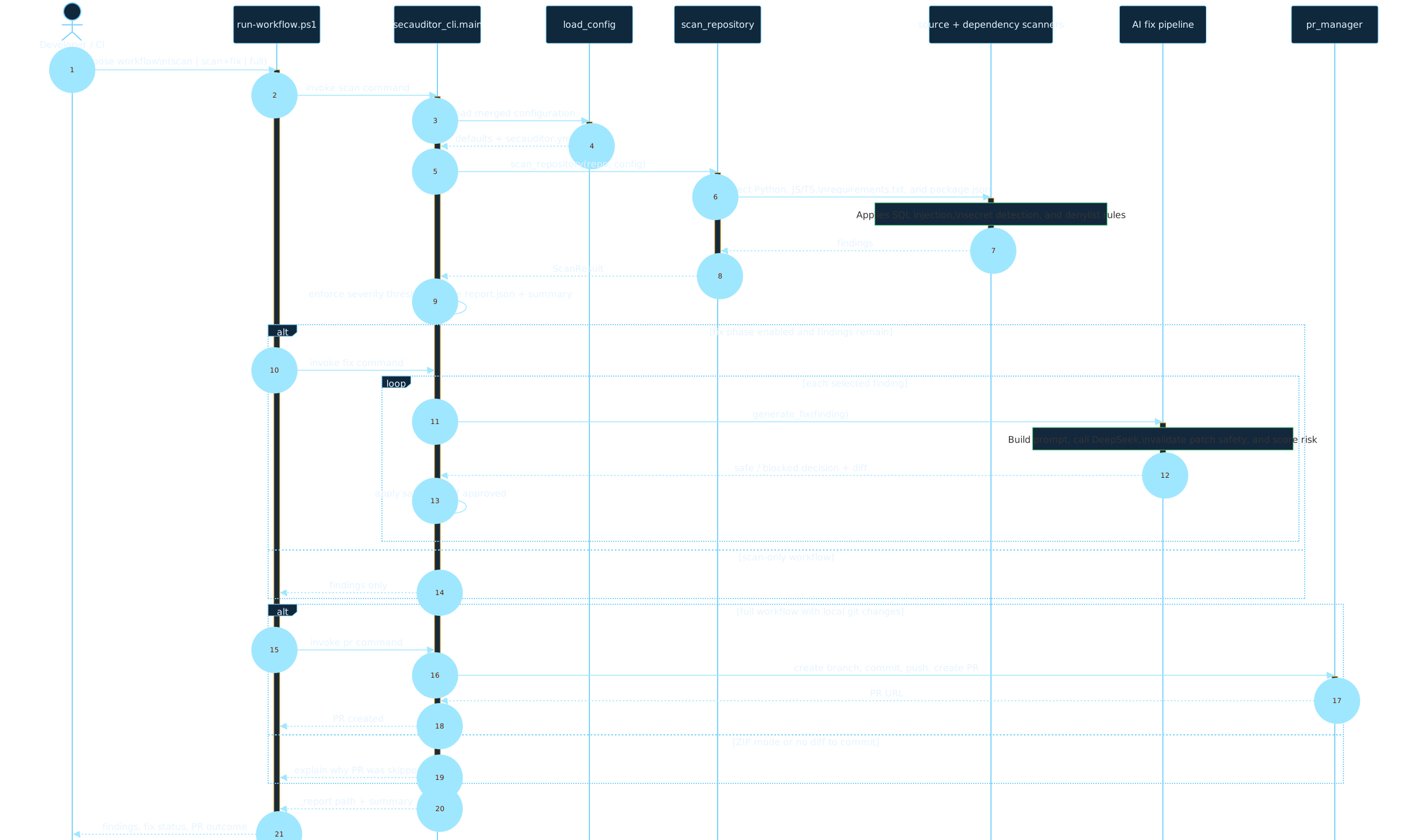
Expanded into a larger, easier-to-read timeline so the scan, fix, validation, and PR branches are visible without squeezing the labels into a narrow card.

Open zoomable SVG
Security Auditor sequence diagram showing runtime flow through configuration, scanning, AI fix generation, validation, and PR automation

Best for following command order, conditional fix execution, and when PR creation is skipped.

See a scan in action

Click "Run Scan" to simulate what Security Auditor finds in a vulnerable repository.

🗂️ example-repo scan
0 Critical
0 High
0 Medium
0 Fixed

Four ready-to-use workflow modes

Copy a mode that matches your team's security maturity — from visibility-only to full auto-remediation.

Basic Scan

Report findings without blocking CI. Perfect for teams rolling out security scanning for the first time — zero disruption, full visibility.

  • Runs on every push and pull request
  • Generates report.json artifact
  • Never fails the build
  • No secrets required
.github/workflows/security.yml
name: Security Scan
on: [push, pull_request]

jobs:
  scan:
    runs-on: ubuntu-latest
    steps:
      - uses: actions/checkout@v4
      - uses: taoufikmohamed/securityauditor@v2
        with:
          repo-path: '.'
          mode: 'scan'
          output-path: 'security-report.json'

      - name: Upload report
        if: always()
        uses: actions/upload-artifact@v4
        with:
          name: security-reports
          path: security-report.json

Strict CI Fail Mode

Block merges when high or critical vulnerabilities are found. Use this to enforce security gates in your CI pipeline.

  • Exits with code 1 on critical/high findings
  • Blocks PRs until fixed
  • Still uploads report as artifact
  • Works with branch protections
.github/workflows/security-strict.yml
name: Security Scan (Strict)
on: [push, pull_request]

jobs:
  scan:
    runs-on: ubuntu-latest
    steps:
      - uses: actions/checkout@v4
      - uses: taoufikmohamed/securityauditor@v2
        with:
          repo-path: '.'
          mode: 'scan'
          output-path: 'security-report.json'
          fail-on-findings: 'true'  # ← blocks CI

      - name: Upload report
        if: always()
        uses: actions/upload-artifact@v4
        with:
          name: security-reports
          path: security-report.json

AI Auto-Fix + Pull Request

Let DeepSeek AI generate safe patches and automatically open a PR with fixes. Developers just review and merge.

  • AI-generated fix diffs via DeepSeek
  • Safety validation before applying
  • Requires DEEPSEEK_API_KEY secret
  • Creates branch + PR automatically
.github/workflows/security-autofix.yml
name: Security Scan & Auto-Fix
on: [push, pull_request]

jobs:
  scan-and-fix:
    runs-on: ubuntu-latest
    permissions:
      contents: write
      pull-requests: write
    steps:
      - uses: actions/checkout@v4
        with:
          fetch-depth: 0
      - uses: taoufikmohamed/securityauditor@v2
        with:
          mode: 'fix'
          apply-safe-fixes: 'true'  # ← AI auto-applies
        env:
          DEEPSEEK_API_KEY: ${{ secrets.DEEPSEEK_API_KEY }}

      - name: Create PR with fixes
        uses: peter-evans/create-pull-request@v5
        with:
          title: '[Security] Automated fixes'
          branch: 'security/automated-fixes'

PR Comment Report

Post a summary of findings as a PR comment so developers see security results inline during code review.

  • Posts findings count on PR
  • Shows critical count inline
  • No AI key required
  • Works with any base CI setup
.github/workflows/security-comment.yml
name: Security Scan (PR Comment)
on: [pull_request]

jobs:
  scan:
    runs-on: ubuntu-latest
    steps:
      - uses: actions/checkout@v4
      - uses: taoufikmohamed/securityauditor@v2
        with:
          mode: 'scan'
          output-path: '${{ github.workspace }}/report.json'

      - name: Comment findings on PR
        if: github.event_name == 'pull_request'
        uses: actions/github-script@v7
        with:
          script: |
            const fs = require('fs');
            const r = JSON.parse(
              fs.readFileSync('report.json','utf8'));
            github.rest.issues.createComment({
              issue_number: context.issue.number,
              owner: context.repo.owner,
              repo: context.repo.repo,
              body: `🔒 Security: ${r.summary.total} findings`
            });

Action Input Reference

All inputs are optional. Sane defaults get you running in under 60 seconds.

Input Default Description
repo-path . Path to the repository to scan
config-path config/secauditor.yml Path to the auditor configuration file
mode scan scan reports findings · fix generates and applies AI diffs
fail-on-findings false Exit with code 1 if high/critical findings exist — use to block merges
apply-safe-fixes false Auto-apply safe AI-generated diffs in fix mode
output-path report.json Path to write the JSON findings report
🛒

Available on GitHub Marketplace

Security Auditor is published to the GitHub Marketplace under the Security category. Add it to any repository with a single step — no installation, no containers, no maintenance overhead.

🛡️ Category: Security
⭐ Verified action
🔖 v2
🐍 Python + JS support
🤖 DeepSeek AI fixes
View on GitHub Marketplace    Star on GitHub

Up and running in 4 steps

No DevSecOps experience needed. If you have a GitHub repository, you can add security scanning today.

1
📁

Create the workflow file

In your repository, create .github/workflows/security.yml — GitHub will auto-detect it.

2
📋

Paste a mode above

Copy Mode 1 (Basic Scan) to start. No API key or config file required for your first scan.

3
🚀

Push or open a PR

The action triggers automatically. Check the Actions tab to see your first scan results.

4
🔧

Upgrade when ready

Add fail-on-findings: 'true' to enforce security gates, or add your DeepSeek key for AI auto-fixes.

Or run locally (PowerShell / CLI)

PowerShell — one-command workflow
# Clone and set up
git clone https://github.com/taoufikmohamed/securityauditor
cd securityauditor

# Run interactive workflow (auto-installs deps)
.\run-workflow.ps1

# Or non-interactive scan
.\run-workflow.ps1 -Workflow scan -RepoPath . -NonInteractive

# Full scan + fix + PR
.\run-workflow.ps1 -Workflow full -RepoPath . -BaseBranch main

# Scan a GitHub repo by URL (no clone needed)
.\run-workflow.ps1 -Workflow scan -RepoUrl https://github.com/owner/repo -NonInteractive